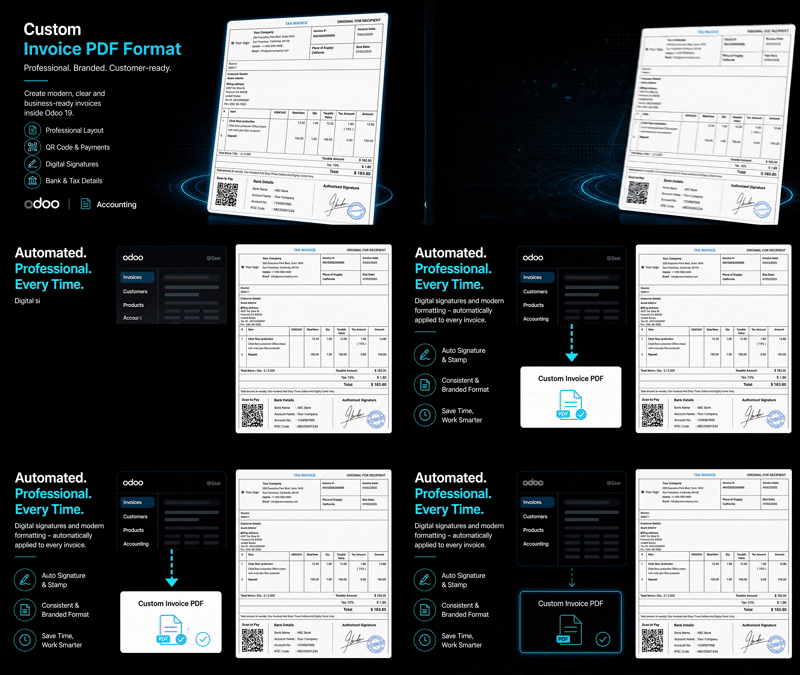
Custom Invoice PDF Format | Professional Invoice Report Template with QR Payment & Digital Signature
Create modern branded invoice PDF reports with QR payments, tax details, bank information, and digital signatures in Odoo.
₹ 4,700.00
 Last Updated : 08 June 2026 (v19.0.0.1.0)
Custom Invoice PDF Format
Enhance your business image with a professional, fully customizable, and beautifully designed tax invoice PDF format.
Transform your standard Odoo invoices into a highly professional, beautiful Tax Invoice PDF. Our module provides a custom report template that cleanly organizes company details, customer information, product items, and tax summaries.
It includes support for displaying bank details, dynamic QR codes for easy payments, and authorized signatures directly on the printed document, saving you time and ensuring compliance.
Why Choose Our Custom Invoice Module?
Professional Design
Make a lasting impression with a clean, structured, and modern invoice layout that highlights your brand.
Dynamic QR Code Integration
Add payment QR codes (like UPI) directly to your invoices to facilitate faster customer payments.
Comprehensive Tax Summary
Provide clear and legible tax breakdowns, including HSN/SAC codes, taxable values, and integrated tax amounts.
Bank Details Integration
Display your bank account information clearly at the bottom of the invoice for direct bank transfers.
Authorized Signatures
Automatically append authorized digital signatures or stamps to every invoice PDF generated.
Seamless Odoo Integration
Works flawlessly with standard Odoo accounting, requiring no complex configurations—just install and print.
Common Use Cases & Benefits
Common Use Cases
- B2B and B2C businesses needing professional tax invoices.
- Companies requiring specific formats with QR codes for quick payments.
- Organizations that need to display authorized signatures without manual stamping.
- Businesses operating in regions requiring strict tax breakdowns.
- Any company looking to enhance their corporate image with better documents.
- Retailers and wholesalers that print invoices directly for customers.
- Service providers needing a clean format for consulting fees.
Benefits
- Elevates brand perception with a polished, modern document.
- Reduces manual work by automatically adding stamps and signatures.
- Accelerates payments by including clear bank details and QR codes.
- Ensures tax compliance with dedicated, detailed summary tables.
- Fully responsive design optimized for standard A4 printing.
- Easy to configure straight from the company settings.
- Compatible with standard Odoo invoicing and accounting workflows.
- No external dependencies required, pure QWeb template.
- Enhances customer trust with clear terms, conditions, and structured data.
How it works
- Go to Settings > Companies and upload your Invoice Signature and QR Code images.
- Create a new invoice from the Accounting or Invoicing app.
- Add your customer details, products, and verify taxes.
- Confirm the invoice to generate an invoice number.
- Click on Print and select 'Custom Tax Invoice'.
- Odoo generates the beautifully formatted PDF.
- Send the professional invoice to your customer.
- Receive payments faster with the included QR code.
- Maintain an organized record of all sent invoices.
Example : Generating a Custom Tax Invoice
A business wants to issue professional invoices:
Instead of using the basic standard Odoo layout...
...they install the Custom Invoice PDF Format module.
They configure their bank details, upload a signature stamp, and a UPI QR code in the company settings.
Now, whenever an invoice is validated, they can instantly print a 'Custom Tax Invoice'.
The resulting PDF automatically includes the QR code, signature, bank details, and a comprehensive tax summary, impressing their clients and ensuring fast payments.
Key Features
Professional PDF Layout
- Clean & Modern Design
- Optimized for A4 Printing
- Structured Data Presentation
- Highlight Company Branding
- Clear Customer Details
- Terms & Conditions Section

Dynamic Signatures & QR
- Upload Signature Stamp
- Upload Payment QR Code
- Auto-append to PDFs
- Digital Signature Footer
- Configurable per Company

Comprehensive Tax Table
- HSN/SAC Code Support
- Taxable Value Breakdown
- Integrated Tax Rates & Amounts
- Grand Total Computation

Bank & Payment Details
- Display Configured Bank Accounts
- Account Number & IFSC
- Branch Information
- UPI/QR Fast Payments

Easy Integration
- Works with Standard Invoicing
- No Complex Setup
- Print directly from Invoice
- Compatible with Odoo 19
Version 19.0.0.1.0 | Released on : 08th June, 2026
Support
Get Immediate support for any of your query
You will get 90 days free support for any doubt, queries, and bug fixing (excluding data recovery) or any type of issue related to this module.
WRITE TO US AT :
sales@serynto.comFor any help and doubt or issue regarding the module, Drop a mail to our technical team.
RAISE A TICKET AT :
https://serynto.com/helpdeskFor support or to request customization, Create A Support Ticket by copying the link and opening it in a new tab.