Skip to Content
CRM Sale Order Lines | CRM Opportunity Products | CRM Product Catalog | CRM Product Lines | Opportunity Products & Quotations | CRM Line Items | CRM Quote Builder | CRM Quotations | CRM Product Management | Quotation from CRM

CRM Sale Order Lines | CRM Opportunity Products | CRM Product Catalog | CRM Product Lines | Opportunity Products & Quotations | CRM Line Items | CRM Quote Builder | CRM Quotations | CRM Product Management | Quotation from CRM

Manage sale order lines directly within CRM views

₹ 5,546.00

Author Serynto Technologies
Technical Name crm_sale_order_lines
License OPL-1
Versions 17.0 18.0 19.0
Last Updated : 19 MAY 2026 (v19.0.0.1.0)

CRM Sale Order Lines

Manage products, quantities, pricing, and customer requirements directly from CRM opportunities in Odoo 19.

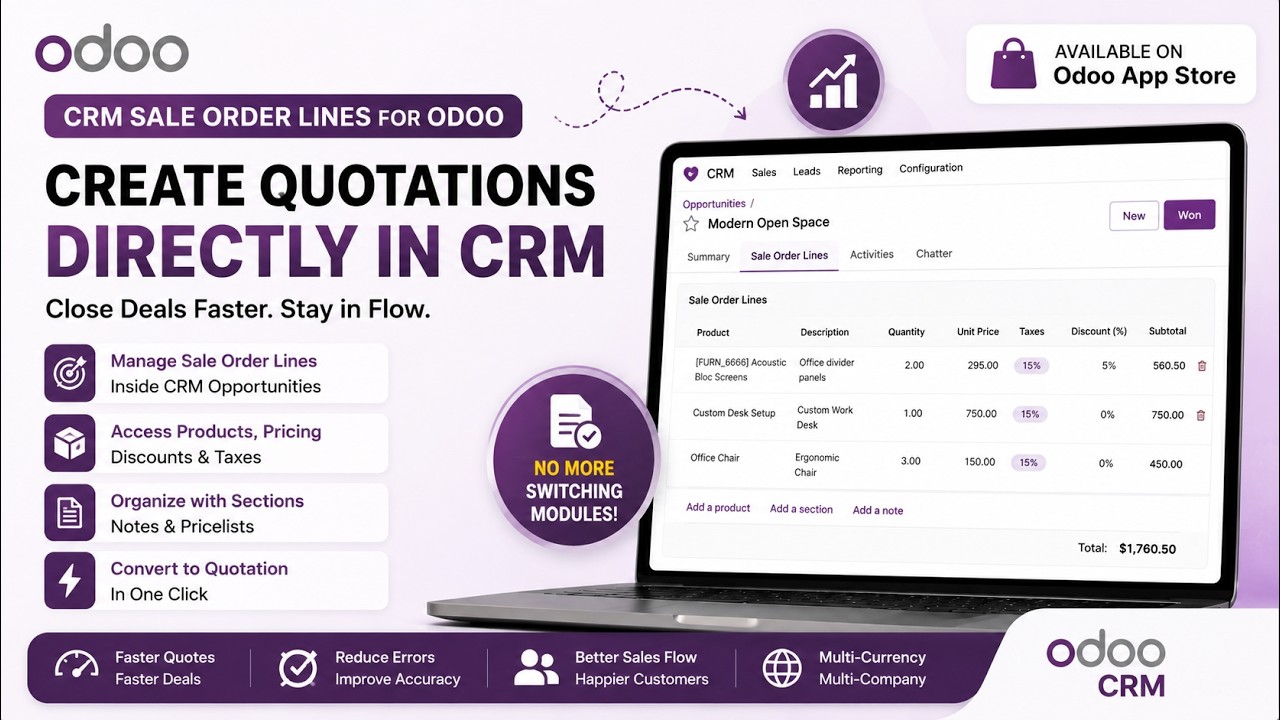
Build quotations during the sales process without leaving the opportunity. Add products, sections, and notes using the familiar Odoo sale order lines interface, complete with catalog support, pricelists, discounts, taxes, variants, and units of measure.

Sales teams can prepare product proposals while discussing requirements with customers, keeping all commercial information visible inside the CRM pipeline until the opportunity is ready to become a quotation or sales order.

Why Use This Module?

Keep Everything in CRM

Manage products, quantities, pricing and notes directly from opportunities.

Faster Lead Qualification

Add products during discussions before creating quotations.

Better Customer Conversations

View selected products, prices and requirements inside CRM.

Catalog Product Selection

Quickly browse and add products using Odoo catalog interface.

Automatic Transfer

Convert opportunity products directly into quotations.

Reduce Navigation

No need to switch screens to check products, prices or notes.

Common Use Cases & Benefits

Common Use Cases

  • During customer meetings, salespeople can immediately add products being discussed without creating a quotation first.
  • Quickly build product lists from the catalog while qualifying leads and gathering customer requirements.
  • Record all required products, services, and notes during the opportunity stage and generate the final quotation when approved.
  • Sales teams can progressively refine products and quantities throughout the opportunity lifecycle before creating the quotation.

Benefits

  • Fewer clicks and less screen switching.
  • Faster quotation preparation.
  • Better visibility of proposed products throughout the sales cycle.
  • Improved collaboration between sales and operations.
  • Reduced data duplication.
  • More accurate quotations.
  • Better customer experience during product discussions.
  • Complete lead-to-quotation workflow from a single CRM screen.

How it works

  1. Open an opportunity in CRM > Pipeline.
  2. Use the embedded sale order lines to add products, sections, and notes.
  3. Apply taxes, discounts, pricelists, and choose variants/UoM as needed.
  4. Create a quotation or copy lines into a standard sale order when ready.

Key Features

Add products directly from CRM opportunities
Support for product catalog selection
Add sections and notes
Manage quantities, UoM, variants, taxes, and discounts
Pricelist integration
Product availability visibility.
Print product catalogs directly from CRM.
Automatically transfer opportunity lines to quotations and sales orders.
Uses the standard Odoo sale order lines experience.

Version 19.0.0.1.0 | Released on : 19th May, 2026

UPDATE Initial Release.
Yes, this app works perfectly with both Odoo Community and Enterprise editions.
Yes, we provide free support for any doubts, queries, and bug fixing.
Yes, for customization requests, you can email us at sales@serynto.com or raise a ticket.

Support

Get Immediate support for any of your query

You will get free support for any doubt, queries, and bug fixing (excluding data recovery) or any type of issue related to this module.

WRITE TO US AT :

sales@serynto.com

For any help and doubt or issue regarding the module, Drop a mail to our technical team.

RAISE A TICKET AT :

https://serynto.com/helpdesk

For support or to request customization, Create A Support Ticket by copying the link and opening it in a new tab.